Picbed Migration: from Aliyun OSS to cloudflare R2
导言
Aliyun charge me 10RMB per month, and the fee grows 2RMB per month. So i decide to move to cloudflare R2 which not charge the egress bandwidth.
STEP1: Batch download my Pic-set From Aliyun OSS using ossutil64
Click Download button trigers stupid individual web download
Goto the bucket page and download all pictures(1) in img directory.
- 1000 files about 350MB
ossutil64
- 根据windows系统版本下载ossutil安装包,解压使用,双击
ossutil.bat跳出命令行窗口 - config access authority(1)
ossutil64.exe config -e oss-cn-hangzhou.aliyuncs.com -i <accessKeyId> -k <accessKeySecret> - 本地批量上传至OSS:
ossutil64.exe cp <本地目录> oss://<bucketName>[/<上传路径>/] -r - OSS批量下载至本地:1
ossutil64.exe cp oss://<bucketName>/[<上传路径>/] <本地目录> -r,e.g,ossutil64.exe cp oss://shaojiemike/img . -r
- 创建RAM用户的AccessKey and
oss-cn-hangzhoumust be the location of bucket
STEP2: Setup R2
- support 银联 and fill CVC(1) and 有效期(2)2。Need to recharge 1 USD(US dollar)
- 但是我没有自己的信用卡,申请了中行的一个校园数字信用卡(3), 中国银行APP申请然后APP激活,完全不需要去线下网点。
- Click
Create a bucketand named itshaojiemikeand select loactionAPAC - CLick
Settingsandconnect domainto addpic.shaojiemike.top - Click
active accessinR2.dev subdomain
- The Card Verification Code, or CVC, is an extra code printed on your debit or credit card. With most cards (Visa, MasterCard, bank cards, etc.) it is the final three digits* of the number printed on the signature strip on the reverse of your card
- 信用卡有效期是指从信用卡发卡时间至停止使用的时间,有效期涉及用卡安全请勿随意透露,目前仅能通过信用卡正面的卡号下方查看。 有效期的格式是MM/YY,在信用卡正面下方四位数,前两位代表月份,后两位代表年份,如04/21,代表有效期到2021年4月30日。
- 数字信用卡没有实体卡,不用担心“薄薄”的一张卡片丢失被盗刷或者忘记密码,数字信用卡进一步提高了用户在消费使用时的安全性和便捷性。
STEP3: upload your Pic-Set to R2
您最多可以从仪表板上传 100 个文件。请使用 Wrangler CLI 或 API 上传更多文件。
test upload using Wrangler
- install
sudo npm install wrangler --save-dev -g3 - config authority, when you first time using
wranglerwill triger a url web forward to authority. Maybe you needssh -L 8976:127.0.0.1:8976 -vN -f -l shaojiemike snode6.acsalab.comto forword the response. - and test upload one file
batch upload using Wrangler
you can use the script to upload files in directory one by one, and check the upload.log for failed ones
#!/bin/bash

# Set the directory where the images are located
img_dir="img"
bucket="shaojiemike"

# Loop through each file in the "img" directory
for file in "$img_dir"/*; do
      if [ -f "$file" ]; then
            # Extract the filename (without the path)
            filename=$(basename "$file")

            # Build and execute the wrangler command
            wrangler_command="wrangler r2 object put $bucket/$img_dir/$filename --file=$file"
            echo "Uploading $filename... in $file"
            $wrangler_command

            # Check the exit status of the wrangler command
            if [ $? -eq 0 ]; then
                  echo "Uploaded $filename successfully" |tee -a upload.log
            else
                  echo "Failed to upload $filename" |tee -a upload.log
            fi
      fi
done
And you can access pic through url like pic.shaojiemike.top/img/20220705171352.png
STEP4: Change the picture url in your markdown
Just global replace shaojiemike.oss-cn-hangzhou.aliyuncs.com/img to pic.shaojiemike.top/img
STEP5: Setting picgo
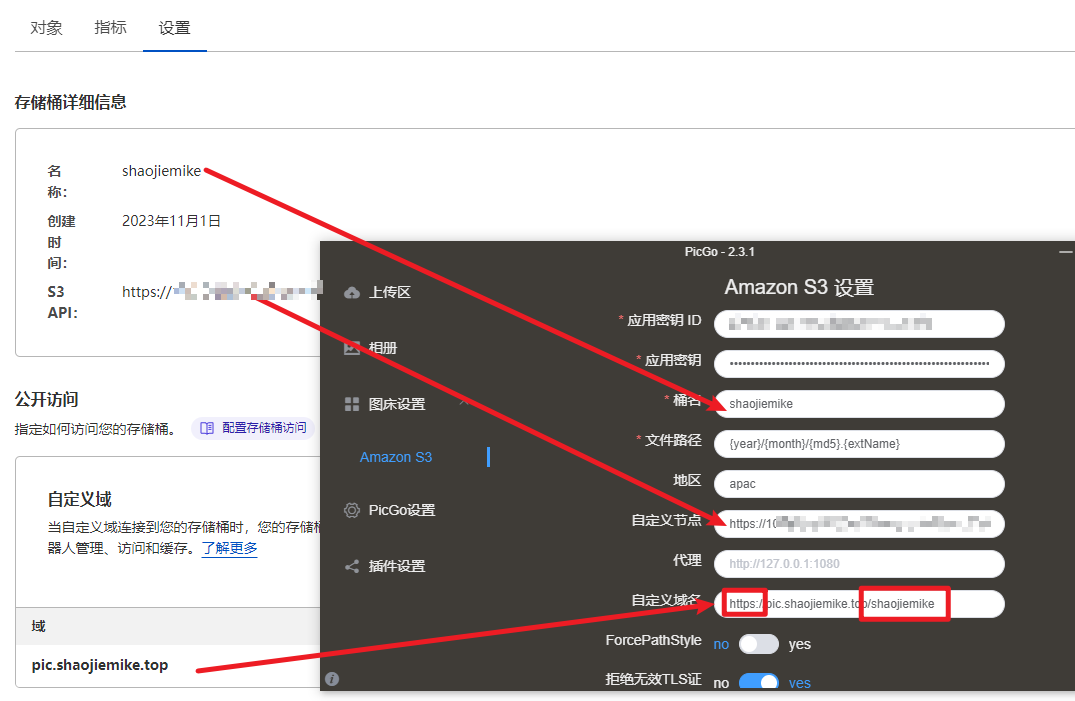
STEP6: 2026 PicGo + R2 自动化 Debug
结论
PicGo 的本地 Server 仍然适合作为图片自动化入口,但当 S3 插件在 R2 上传阶段出现 socket hang up 或 TLS 断开时,不应继续用 ping 判断网络。更可靠的判断是:R2 API 是否能签名上传、对象是否能 HeadObject、公开 URL 是否能 HTTP 200。
本次现象
POST http://127.0.0.1:36677/upload能进入 PicGo,但 PicGo S3 插件在上传阶段长时间等待或报错。- R2 endpoint 的 DNS、TCP 443、TLS 都可以连通,因此不是简单的域名不通。
- 使用 R2 账户 endpoint、path-style、
region=auto、不发送 ACL 时,可以成功PutObject和HeadObject。 -
公开访问并不是
{path},而是当前域名下的{bucket}/{path},例如:
常见误区
R2 的 S3 API endpoint 不是公开图床 URL。对象上传成功后,如果自定义域名或 R2.dev public access 没有映射到同一个 bucket/path,Markdown 里仍然会 404。
可复用命令
PicGo Server 优先:
python3 /Users/Zhuanz/.codex/skills/image-cloud-uploader/scripts/picgo_upload.py \
  /absolute/path/to/image.png
PicGo S3 插件失败时,直接使用 R2 fallback:
python3 /Users/Zhuanz/.codex/skills/image-cloud-uploader/scripts/r2_upload.py \
  /absolute/path/to/image.png
如果公开 URL 模式已知,可以显式指定:
python3 /Users/Zhuanz/.codex/skills/image-cloud-uploader/scripts/r2_upload.py \
  --public-url-pattern 'https://pic.shaojiemike.top/{bucket}/{path}' \
  /absolute/path/to/image.png
PicGo 配置建议
R2-safe PicGo
对 Cloudflare R2,PicGo S3 插件更稳的非密钥配置是:region=auto、pathStyleAccess=true、不要发送 ACL: public-read,公开 URL pattern 使用实际可访问的 bucket 前缀,例如 https://pic.shaojiemike.top/{bucket}/{path}。